
Field note, the first in a series on AI for defenders: what actually happens when you put these tools next to a real SOC. Defending together in the age of AI means being honest about where these tools fail, including right alongside us.
TL;DR: A malformed User-Agent: header slipped past a whole SOC as a false positive, and the AI assistant we double-checked it with failed the exact same way. Rerun as plain text eight months later, a newer model still read straight past it, so this is not a screenshot problem. Putting an AI next to your analysts doesn’t automatically buy you a second, independent opinion; it can fail in the same direction you do.
As security professionals, we tell ourselves that our edge is attention to detail. We read logs for a living. We hunt for the thing that doesn’t belong. And when we put an AI assistant next to us in the SOC, we expect it to catch what we miss, because it reads differently than we do.
A recent incident broke both of those assumptions at the same time.
It was a sign-in log in a customer SOC I will not name. The detection rule fired. The team reviewed it, talked it through, and closed it as a false positive. We weren’t satisfied, so we pulled the screenshot, sent it to Claude, and asked the same question. (Screenshots are often more efficient than typing: a visual layout, chart, or structured display that would take hundreds of words to describe in text can be shown instantly, preserving the exact context the analyst saw.)
Claude missed the actual issue too, in almost exactly the way we had.
That parallel is why this is worth writing down.
What we were looking at
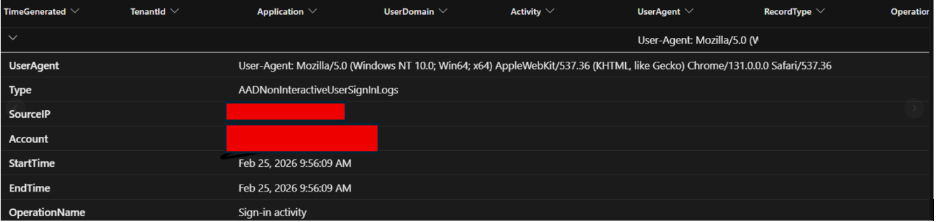
The actual log, as the analysts and the AI saw it. SourceIP and Account redacted; the UserAgent value untouched, because that value is the whole story.
The log was an AADNonInteractiveUserSignInLogs entry. A token refresh in the background, not a user sitting down and clicking a button. The fields the analyst sees are stacked the way every Sentinel and Defender user knows them: a column of bold field names on the left, the values on the right. UserAgent is one of those rows.
The value next to UserAgent looked, to all of us, like a normal browser string. Mozilla, AppleWebKit, Chrome version, Safari. The kind of string we scan past hundreds of times a day.
It wasn’t a normal browser string. The value started with User-Agent:.
Read that again, because it’s the entire incident.
A real browser puts Mozilla/5.0 ... into the User-Agent header. The header name is User-Agent. The header value is the browser string. When that request gets logged into a sign-in record, only the value should be captured. Whoever, or whatever, made this request had stuffed the entire header line, name and colon included, into the value field. The result was a UserAgent field whose content read User-Agent: Mozilla/5.0 ....
No browser does that. Hand-rolled scripts do: an automation script or a replay tool whose author copied a header line from somewhere and pasted it into the wrong place. Microsoft’s own rule flags it as a “likely artefact of hardcoding”, and sloppy but benign automation produces it too, which is exactly why a team leans towards false positive. It is also exactly the kind of artifact a detection rule should flag.
In fact, ours did. The analytics rule fired on this sign-in because the UserAgent value started with User. Microsoft ships exactly this detection: a “Malformed user agent” rule from Microsoft Security Research that flags sign-ins whose UserAgent starts with User (among other malformed-header patterns), and it covers AADNonInteractiveUserSignInLogs, the table this sign-in came from. The technique is common enough to warrant a hardcoded rule. The rule is public: MalformedUserAgents.yaml in the Azure-Sentinel repo.
Here is the part of it that fired on this sign-in, trimmed to the one table and the one condition that matter here (the full rule unions six data sources and checks five malformed patterns):
AADNonInteractiveUserSignInLogs
| where isnotempty(UserAgent)
| summarize StartTime = min(TimeGenerated), EndTime = max(TimeGenerated)
    by UserAgent, SourceIP = IPAddress, Account = UserPrincipalName, Type, OperationName
// Likely artefact of hardcoding
| where UserAgent startswith "User" or UserAgent startswith '\"'
Look at the screenshot again: SourceIP and Account are not column names in the sign-in table. They are this rule’s renames, so the record the analysts and the AI were reading came straight out of this detection.
You can check that it fires on this exact value without any log data. datatable runs in any Log Analytics or Azure Data Explorer query window:
datatable(UserAgent: string) [
    "User-Agent: Mozilla/5.0 (Windows NT 10.0; Win64; x64) AppleWebKit/537.36 (KHTML, like Gecko) Chrome/131.0.0.0 Safari/537.36"
]
| where UserAgent startswith "User" or UserAgent startswith '\"'
One row comes back. The rule reads the first four characters, sees User, and fires.
The rule did its job. We didn’t do ours. The team converged on “this is just a weirdly formatted browser string, probably a version oddity, false positive.” Out of caution I sent the screenshot to Claude. It zeroed in on the Chrome version number (131.0.0.0) as the anomaly, gave me a confident analysis about zeroed-out build numbers being a known IoC pattern, and walked right past the actual problem on the line above. When I pointed it out, the response was honest:
I treated the
User-Agent:text as a label in the UI rather than reading it as part of the actual logged value.
I take that for what it is: a model explaining its own failure after the fact, not evidence of what happened inside it. It matched what we had done, and that is why it stuck with me. That sentence is why this post exists. We did the same thing, for reasons that turn out to be the same reasons.
Why the eye misses it
Pull the screenshot up again and pay attention to what your visual system is doing.
The Sentinel detail view renders fields as a two-column key-value layout. Bold label on the left, content on the right. Your eye has been trained on this layout, not just in Sentinel but in every settings panel, every form, every config file, every key-value display you’ve looked at for the last twenty years. That training is so deep it operates below the level of conscious reading. When you see UserAgent followed by content, your visual cortex categorises the bold label as structure and your attention jumps to the content. This is how perceptual learning works: your brain learns the patterns that show up almost every time and stops paying close attention to them.
Now look at the content. It contains a colon. User-Agent: Mozilla/5.0 ...
Your eye applies the same rule it just applied a millisecond ago. The thing before the colon is a label. The thing after the colon is the value. You skip the label. You read the value.
Except this time the colon isn’t structure. It’s data. The attacker’s malformed header looks like a label-value pair because the syntax of an HTTP header is identical to the syntax of a UI key-value display. Your eye applied a learned rule about how documents are structured to a piece of data that was masquerading as structure. The illusion is doing the work. You don’t fail to see the User-Agent: prefix. You see it and reclassify it as something to skip. This is the same mechanism behind optical illusions: your brain makes a decision about what it’s seeing and then stops searching for alternative explanations. Once it decides “that’s a label,” the case is closed.
This isn’t carelessness, and it isn’t a bias in the loose sense the word usually carries. It’s a prior. Your visual system has learned that in the world it normally operates in, “bold text followed by content” is structural information you can compress away. That prior is correct in nearly everything you look at. The attacker’s request landed in the remainder.
Why the model misses it
Here’s the part most security writing gets wrong about AI failures, and the part that matters most if you’re putting these tools into a real SOC.
When you send a screenshot to a model like Claude, what happens under the hood is genuinely different from human reading. The image gets broken into 28×28 pixel patches, those patches become visual tokens, and the model reasons over tokens rather than over pixels or characters. It uses the same token-based reasoning it uses for text. (See Vision - Claude API Docs for the technical details.)
What follows is my best explanation, not a tested one.
Somewhere in that process the text User-Agent: gets recognised, and User-Agent: is one of the most common token patterns in the model’s training data. It appears in HTTP RFCs, in millions of code samples, in curl examples, in browser developer console output, in every protocol tutorial ever written. In essentially all of those contexts, it appears in one specific role: as a header name, the structural label that precedes a value.
The model has, in effect, the same prior the analyst has. When those tokens appear, they’re structural. They’re skip-past tokens. In the training distribution they’re low-information boilerplate, so the model treats them as something to read past on the way to the “real” content, which it identifies as the browser string, and then looks for anomalies in that string. Hence the confident answer about Chrome 131.0.0.0.
And here’s the part that should give you pause: that version isn’t suspicious for the reason given. 131.0.0.0, with the build numbers zeroed out, is the completely normal output of Chrome’s User-Agent Reduction. Every modern Chrome has reported itself this way since version 101. So the model didn’t just walk past the real artifact. It manufactured a fake one, flagging standard browser boilerplate as an indicator of compromise, and did it with confidence.
Two prediction systems, running on entirely different substrates, both trained on data that taught them User-Agent: is structure. Both converged on the same error. Not because the model “thinks like a human.” Because the model and the human were optimised on overlapping data and learned overlapping priors. That overlap is what makes large language models useful at all. It’s also what makes them fail in correlated ways with the humans next to them.
This is the part of AI-in-the-SOC that the marketing keeps missing. Adding an AI assistant doesn’t introduce a second, independent reader. In the cases where it matters most, it can introduce a reader that fails in the same direction as the human, for related reasons, with no warning that the two checks aren’t actually independent.
A defender’s threat model needs to include that correlation.
It’s not only the screenshot
I wanted to know whether the screenshot was the problem, so on October 22, 2026, I reran it as text, in fresh incognito chats with Claude Opus 5.5 on claude.ai. Six times, each in a new chat, I pasted exactly this:
Is this sign-in suspicious?
UserAgent: User-Agent: Mozilla/5.0 (Windows NT 10.0; Win64; x64) AppleWebKit/537.36 (KHTML, like Gecko) Chrome/131.0.0.0 Safari/537.36
Type: AADNonInteractiveUserSignInLogs
SourceIP: <redacted>
Account: <redacted>
StartTime: Feb 25, 2026 9:56:09 AM
EndTime: Feb 25, 2026 9:56:09 AM
OperationName: Sign-in activity
None of the six repeated the fake zeroed-build IoC, so the newer model is better there. But all six led with the Chrome version being out of date, still looking inside the browser string, which is exactly where the original miss started. Only one raised the prefix, as a side note, and wondered whether it might be a rendering artifact rather than data: the same prior, said out loud. Another ended by saying that if the session checked out, this was an outdated browser and “a patching conversation, not an incident.” That is the same benign path the team took.
Then I pasted the value on its own, in another new chat, and said outright which field it came from:
This is the UserAgent value from an Entra non-interactive sign-in. Anything wrong with it?

User-Agent: Mozilla/5.0 (Windows NT 10.0; Win64; x64) AppleWebKit/537.36 (KHTML, like Gecko) Chrome/131.0.0.0 Safari/537.36
The answer opened with “The format is fine” and stated that nothing was malformed.
This is a newer model than the one in the incident, so it is not a clean replay, and a handful of chats is an anecdote, not a benchmark. But it widens the problem. No layout, no bold labels, no visual illusion, and the model still read straight past the prefix, even when told exactly which field it was reading. That fits the token explanation above better than a vision one: the prior travels with the text. It also means “paste the raw log instead of a screenshot” is not the fix.
A note on Claude (and every other model)
Claude is here as an example, not as evidence of a flaw in Anthropic’s model. I’d expect the same failure from GPT, Gemini, Llama, or any LLM trained on overlapping internet data where User-Agent: almost always appears as a header name. I haven’t tested them. The steps at the end are there so you can. This isn’t a Claude problem. This is an every-vendor problem, which is exactly why it matters. The risk isn’t the model. The risk is deploying any AI into your SOC without understanding that it can fail in correlated ways with your team when you haven’t changed how you use it.
A note on sending data to AI platforms
Before you start sharing logs and screenshots with Claude or any AI platform: know what you’re sending. Screenshots of live alerts can contain sensitive fields: account names, source IPs, sometimes tokens or API keys if the display doesn’t redact them carefully. Cloud-hosted AI platforms process that data, and the terms of service matter. If the data could be classified as user or customer information, sending it could trigger data residency requirements, compliance violations, or notification obligations. The screenshot in this post was safe to send because we redacted source IP and account details before it went to Claude. Yours might not be. Read your deployment’s privacy and compliance requirements before pulling that screenshot.
What the rule knew that we didn’t
The Sentinel detection caught this. That’s the most important sentence in this post, and I want to be precise about why.
The detection wasn’t smarter than us. It didn’t reason about HTTP semantics. It didn’t see the optical illusion. It did something neither the human team nor the AI did: it read the field literally, character by character, and applied a rule that said “if the value of this field starts with User, raise an alert.” That’s it. No interpretation. No priors. Just bytes.
The rule fired correctly. The failure happened downstream of the rule, in the human review step where the alert got reclassified as a false positive based on the same misread that fooled all of us. The technology knew. The process let it be argued away.
And to close the loop: the ticket was reopened, the value read byte by byte, and the verdict flipped. It was later confirmed as a real login attempt. The investigation happened in a customer environment, so the detail stays there. The rule had been right the whole time.
That’s a different problem than the one most SOC tooling discussions focus on. It’s not a detection gap. It’s a verification gap in the human and AI layers that sit on top of the detection.
What I don’t know yet
I want to be honest about where this leaves me, because the whole point of this series is that AI for defenders is a frontier and I don’t think anyone is being honest enough about where the edges are.
I don’t have a clean solution. I have three directions I think are worth investigating, and I’m going to spend the next post in this series digging into them properly, with actual experiments where I can run them. These three cover the full stack: prevention (can we fix this upstream?), detection (can we use AI differently?), and process (can we tighten the human checkpoint?).
The structural answer: If the SOC UI hadn’t rendered the malformed value in a way that visually mimicked a label-value pair, the optical illusion wouldn’t have reached the analyst. There may be a real answer at the ingestion or rendering layer: normalisation, escaping, or display rules that make data that looks like structure visibly distinct from actual structure. Fix the illusion at the source instead of asking humans to see through it.
The AI usage answer: A loosely prompted model inherits the human’s prior, as this incident suggests. But the model has one advantage the human doesn’t: you can explicitly instruct it to operate against a different objective. There may be a useful pattern in which the AI’s job is not to “second-read” the analyst’s interpretation, but to do something the human is bad at on purpose: emit the raw bytes, flag any value containing tokens that match its own field name, refuse to interpret until the literal content has been quoted back. Whether that actually works in practice, or whether the prior is too strong to suppress with prompting, is an open question. I plan to test it.
The process answer: The detection fired. The human review undid it. There’s a class of analytics rule (the ones that fire on literal string anomalies that human cognition is wired to skip) where benign closure shouldn’t be allowed without a raw-value verification step. Not “the team agreed it was fine.” A documented re-read of the exact bytes the rule fired on. Agreement is not verification. It’s the principle this whole incident proves.
Which of those three is the right answer? I don’t know yet. Possibly all of them. Possibly none of them work and the real answer is somewhere I haven’t looked. Part two of this series will dig in.
The takeaway
The attacker didn’t use a zero-day. They didn’t use obfuscation. They made a small formatting mistake when constructing an HTTP header, and that mistake produced an artifact that exploited a prior shared by every human who reviewed it and by the AI assistant we tested against. Two independent reading systems, both fooled by the same illusion, both for reasons that trace back to the same root cause: the patterns that make us efficient readers are the patterns that make us vulnerable to inputs that mimic structure.
This is happening in SOCs right now. Not as a rare edge case, but as a live deployment pattern. Many teams are spinning up Claude, ChatGPT, or a custom model expecting it to catch what they miss, without having asked the question we’re asking here: Is the AI failing independently, or in the same direction I do? If this incident feels obvious in hindsight, you’re right. If it feels novel or even concerning, you’re not alone. Most teams deploying AI to triage aren’t yet asking these questions, which means most teams are inheriting this risk blind.
If you’re building AI into your defender workflow, this is the part you need to internalise. It’s not about which model. It’s about how you deploy it next to humans. AI doesn’t fail randomly. It fails in patterns. Those patterns often correlate with how your analysts fail. The places where the correlation is strongest are the places where adding AI gives you the illusion of a second opinion without the substance of one.
This is the frontier of AI for defenders: not better models, but better deployment patterns.
The question we’re sitting with, and the one we’d genuinely like to hear other defenders’ thinking on:
When the model next to you in the SOC fails the same way you do, what do you actually do about it?
Before you answer, try it yourself. Five minutes with whatever AI you use, each run in a new chat with no history:
- The screenshot, the way it happened. Save the redacted screenshot from the top of this post, attach it, and ask Is this sign-in suspicious?
- The record as text. Paste the first prompt in It’s not only the screenshot.
- The value alone. Paste the second prompt from the same section.
Then score each answer. Did it catch the User-Agent: prefix? Did it call 131.0.0.0 suspicious? (It isn’t.) Did it invent anything else? Note the model and version, because results differ between models and between runs of the same model. If yours catches it, that is a result too, and you will have your own data point on whether yours fails the way ours did.
If you’ve lived a version of this, a detection your team or your AI argued away, share it on LinkedIn. Collecting these honestly is what this series is for.
Thanks to the SOC team, who I cannot name, for the discussion that surfaced this, and for being open to revisiting a closed ticket. The conversation about why we missed it has been more valuable than the original detection.
This is post one of a series. Part two will look at concrete prevention and detection ideas, including whether any of the three directions above survive contact with a real test.